By using this site, you agree to the Privacy Policy and Terms of Use.
Accept
Mwalimu NewsMwalimu News
  • Home
  • ExamsHOT
  • Schemes
  • Notes
  • Pages
    • Blog Index
    • Contact Us
    • Search Page
    • My Bookmarks
  • Join Us
Reading: TEACHERS PERFORMANCE APPRAISAL AND DEVELOPMENT (TPAD) USER MANUAL
Share
Notification Show More
Font ResizerAa
Font ResizerAa
Mwalimu NewsMwalimu News
  • Notes
  • Schemes
  • ExamsHOT
  • TSCnEW
  • Edu News
  • Jobs
  • Home
  • ExamsHOT
  • Schemes
  • Notes
  • Pages
    • Blog Index
    • Contact Us
    • Search Page
    • My Bookmarks
  • Join Us
Have an existing account? Sign In
Follow US
  • Home
  • Blog
  • Advertise
  • Privacy Policy
  • Contact
© 2022 Foxiz News Network. Ruby Design Company. All Rights Reserved.
Home » Blog » TEACHERS PERFORMANCE APPRAISAL AND DEVELOPMENT (TPAD) USER MANUAL
TSC

TEACHERS PERFORMANCE APPRAISAL AND DEVELOPMENT (TPAD) USER MANUAL

Mwalimu News
Last updated: August 19, 2022 3:49 pm
Mwalimu News Published August 19, 2022
Share
SHARE

TEACHERS SERVICE COMMISSION

Contents
More Read Teachers Urged to Start Side Hustles Instead of Taking Loans TSC Posting Criteria for Recently Promoted Teachers New Teachers’ Pay Agreement: Increment and Deductions Explained List of Successful Teacher Administrators Promoted in July and August TSC to Demote Non-Graduate Headteachers


mostbet

TEACHERS PERFORMANCE APPRAISAL AND DEVELOPMENT (TPAD) USER MANUAL


  1. On your desktop, click on the start button to open any of the browsers ie, Google chrome, internet explorer, or Mozilla Firefox by clicking on it.
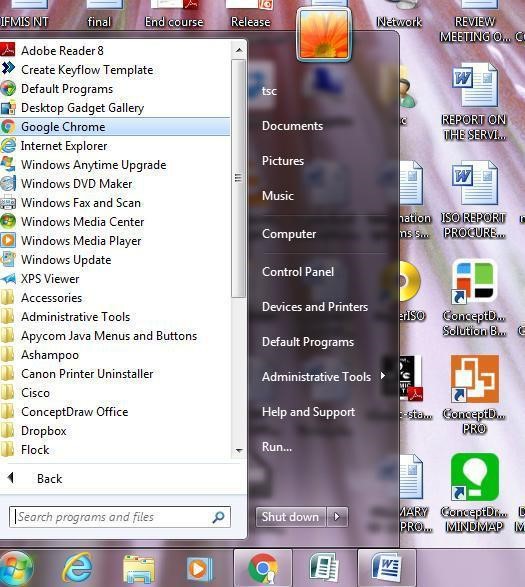


Type in the” address line” the following URL https://www.tsc.go.ke/ and press the enter key


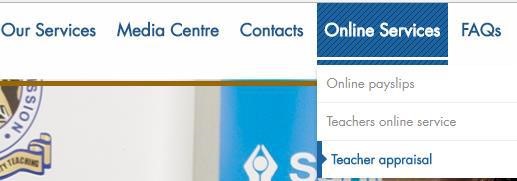
2. The following screen appears. The point on Online Services, below it click on Teacher Appraisal


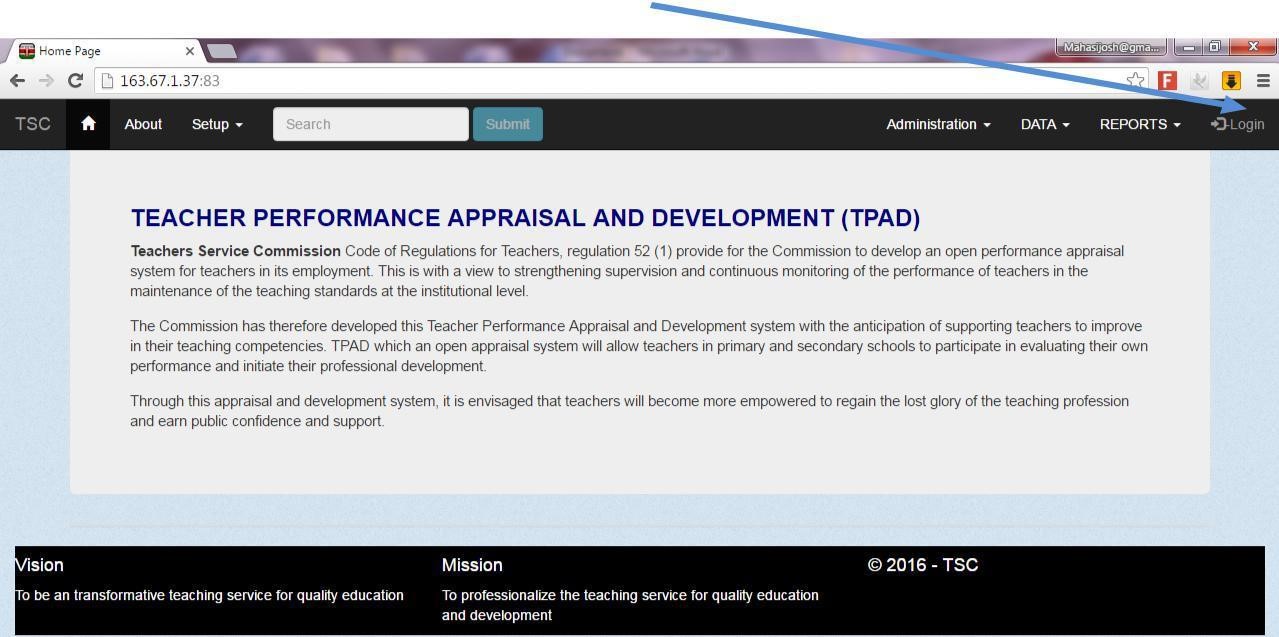
  1. The screen below will be displayed. Click the Login button as shown.
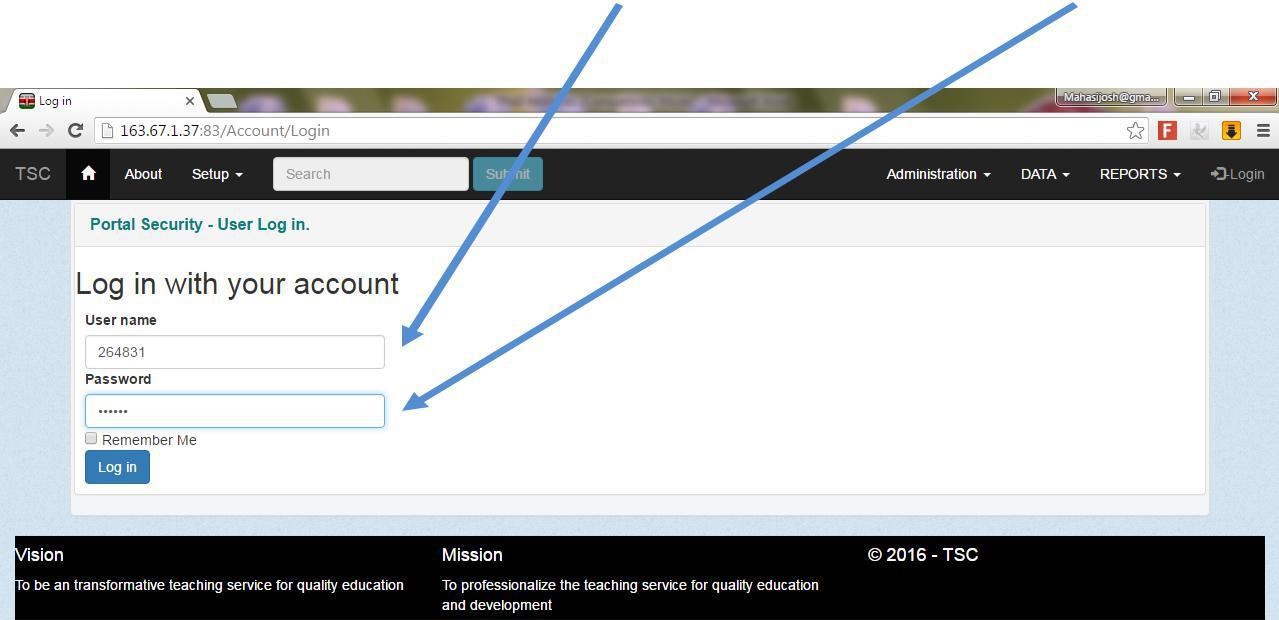
4. The login screen is displayed as below
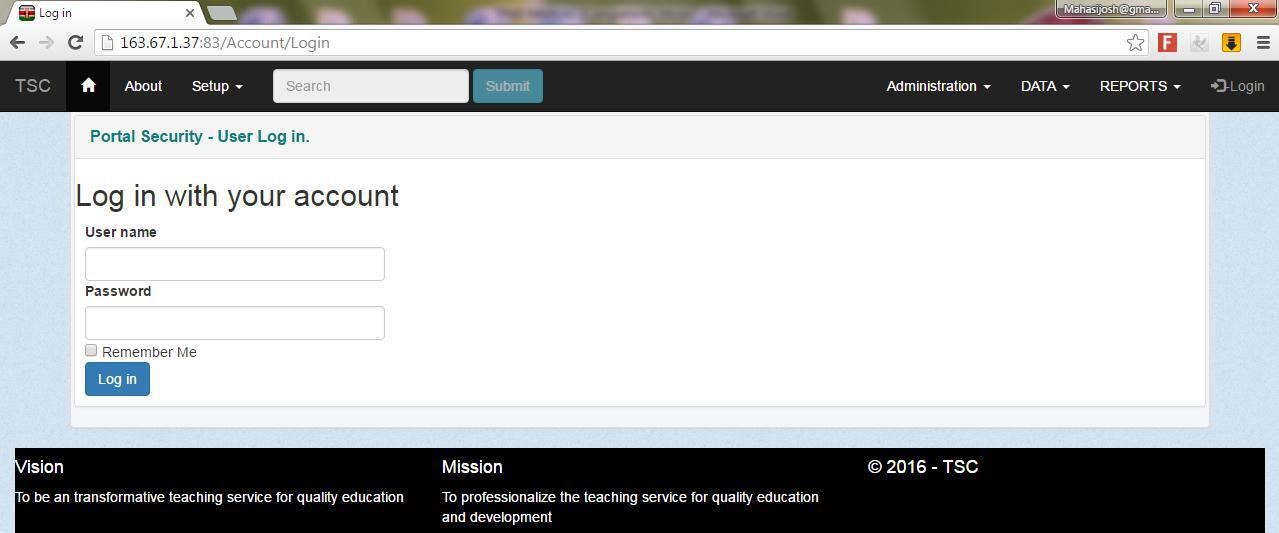
 

5. On the login screen type your TSC Number as your username and password

Then Click on the login button
 

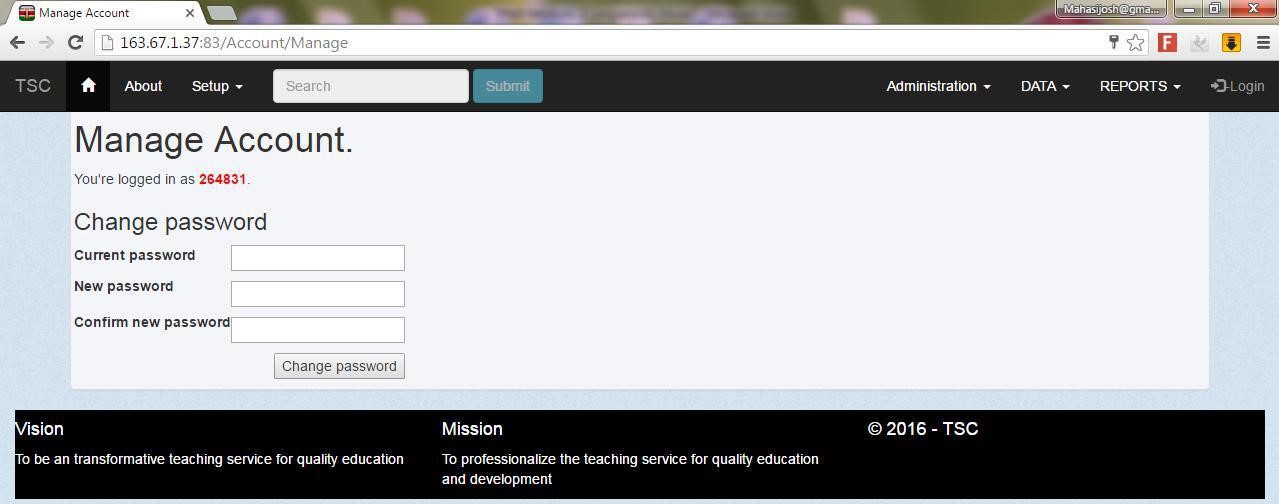
6. The manage account screen appears as below.


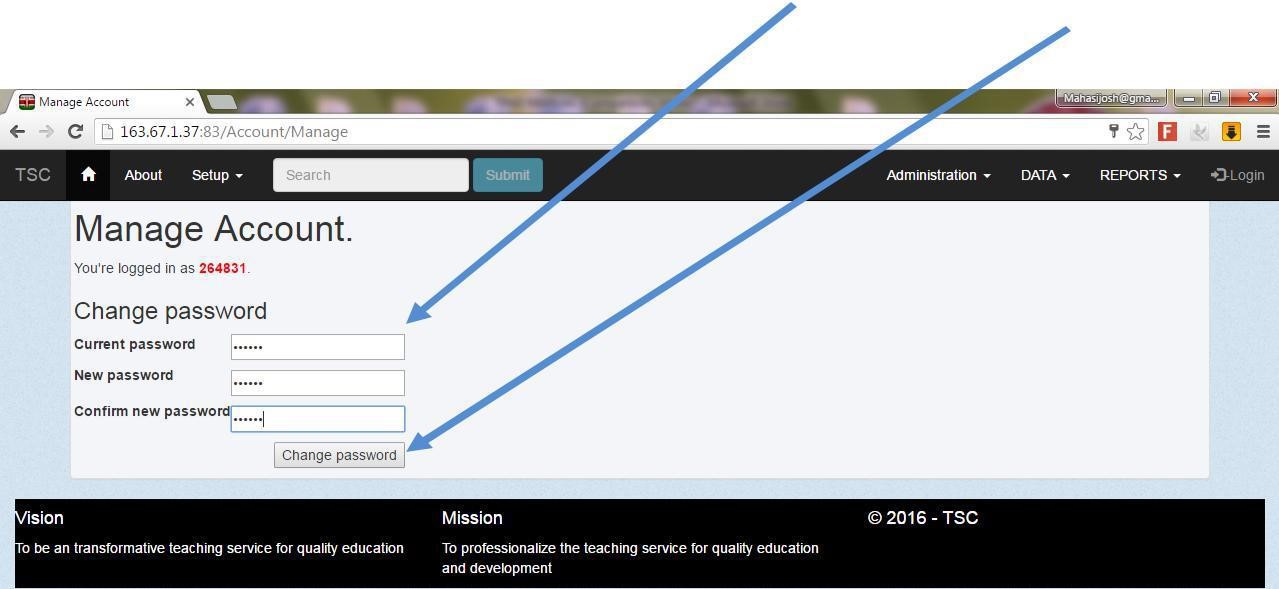
7. In The manage account screen type in to change your password accordingly and then click on the change password button.
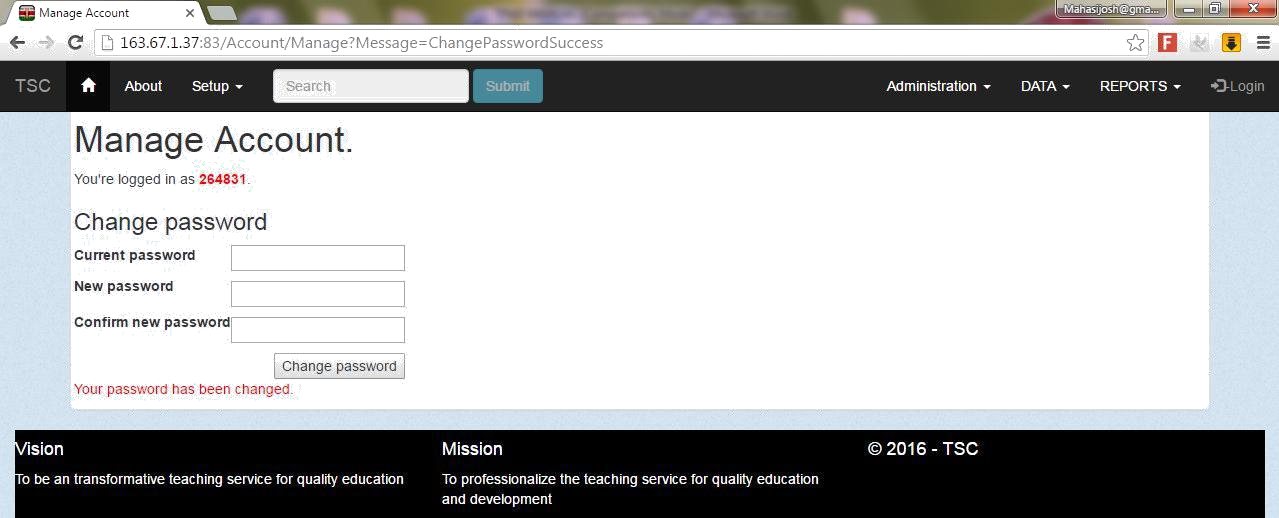
8. The confirmation note will be displayed as shown below and then click on the login button
9. Type in your TSC Number as your username and your new password in the
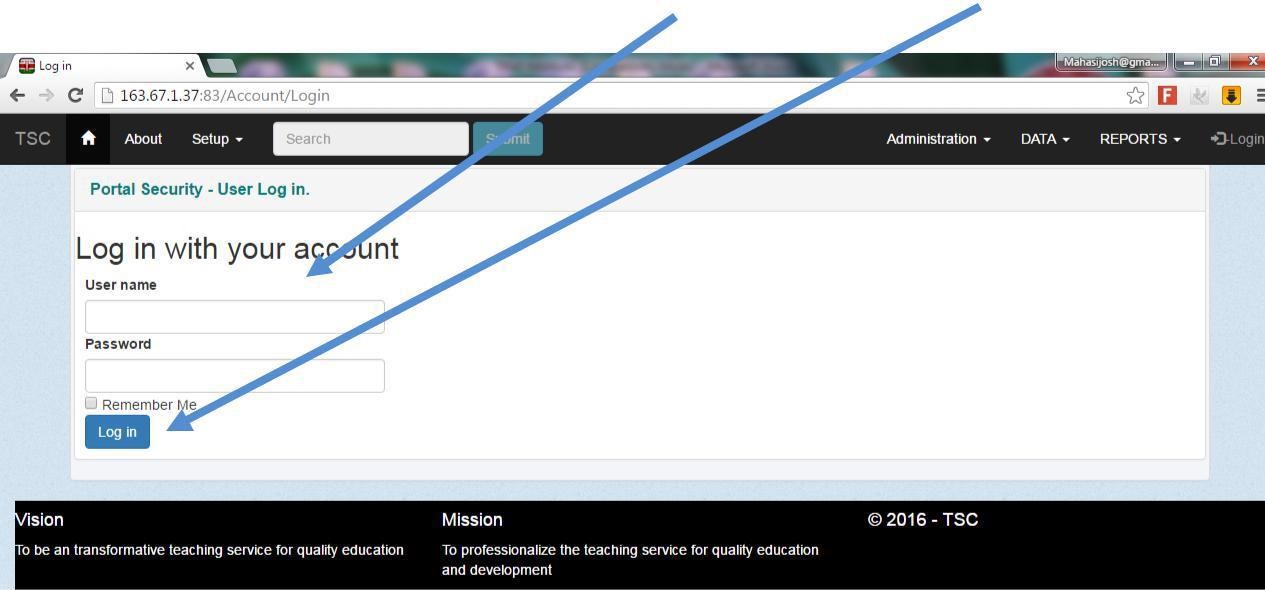
login screen then click login button


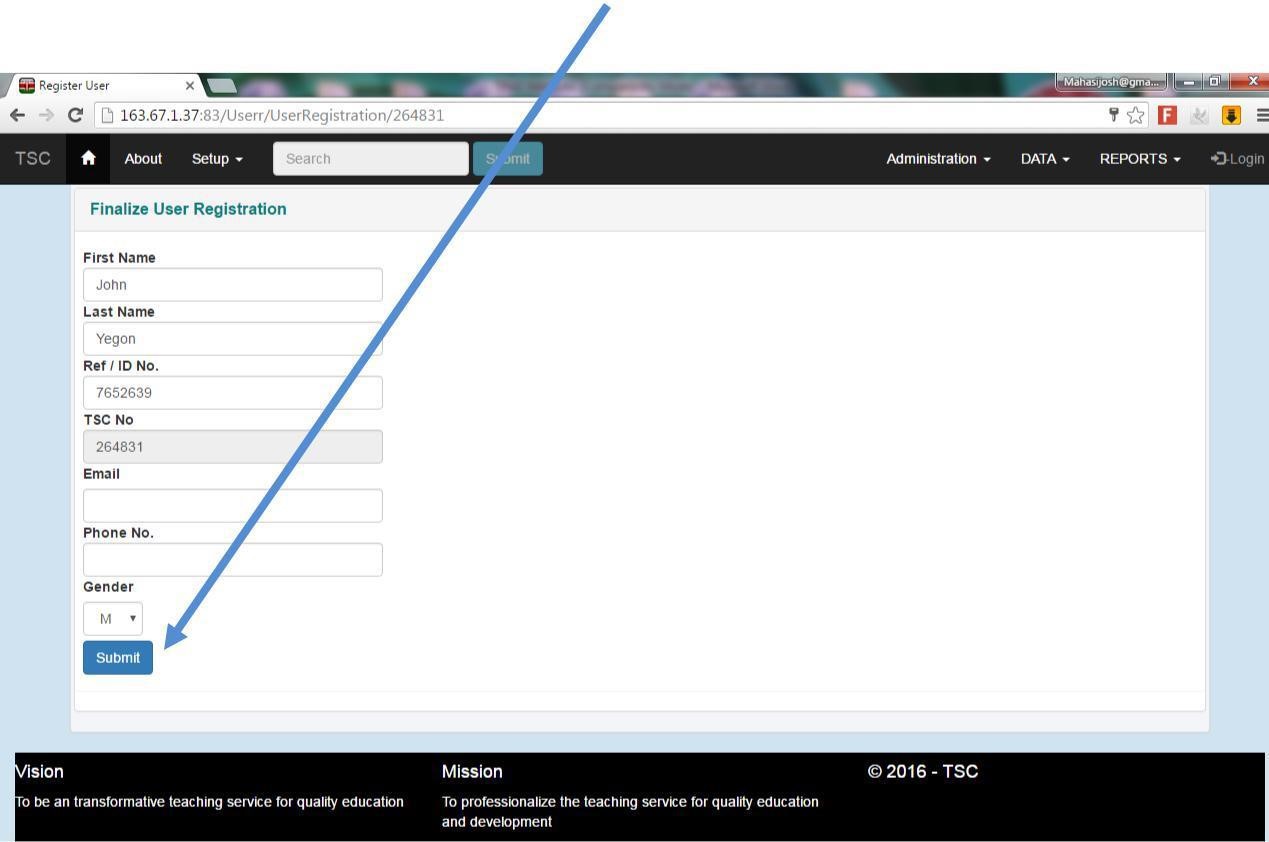
10 . Finalize your registration and click submit button


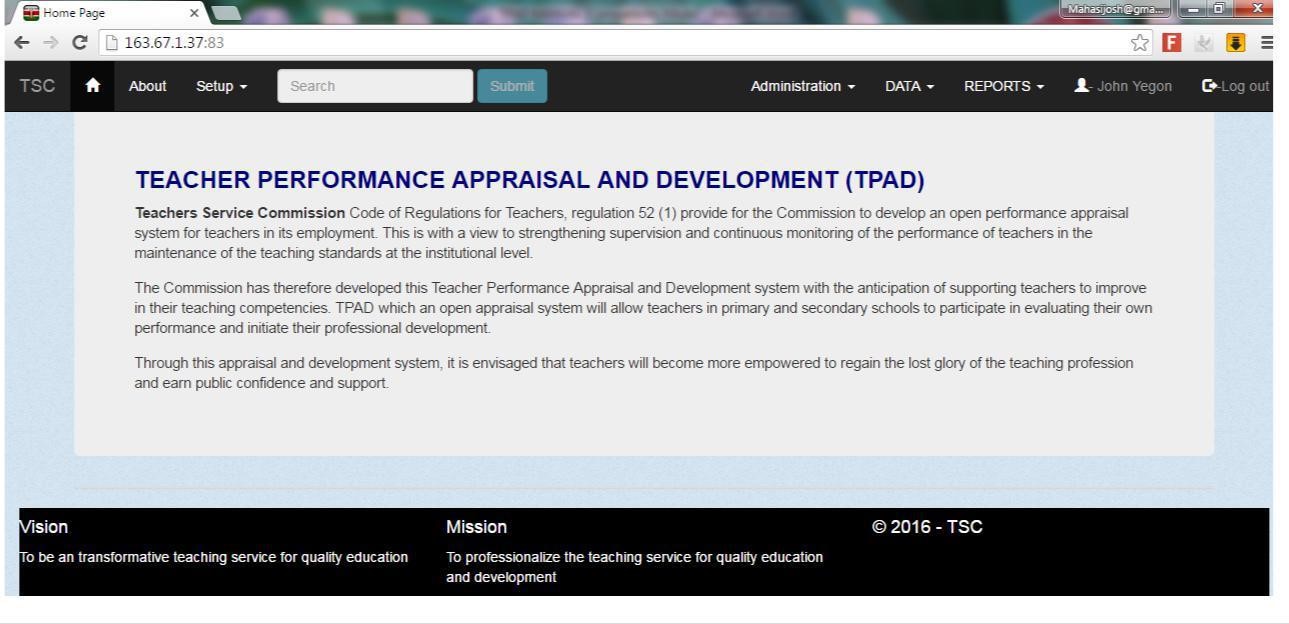
11. The homepage appears as shown below
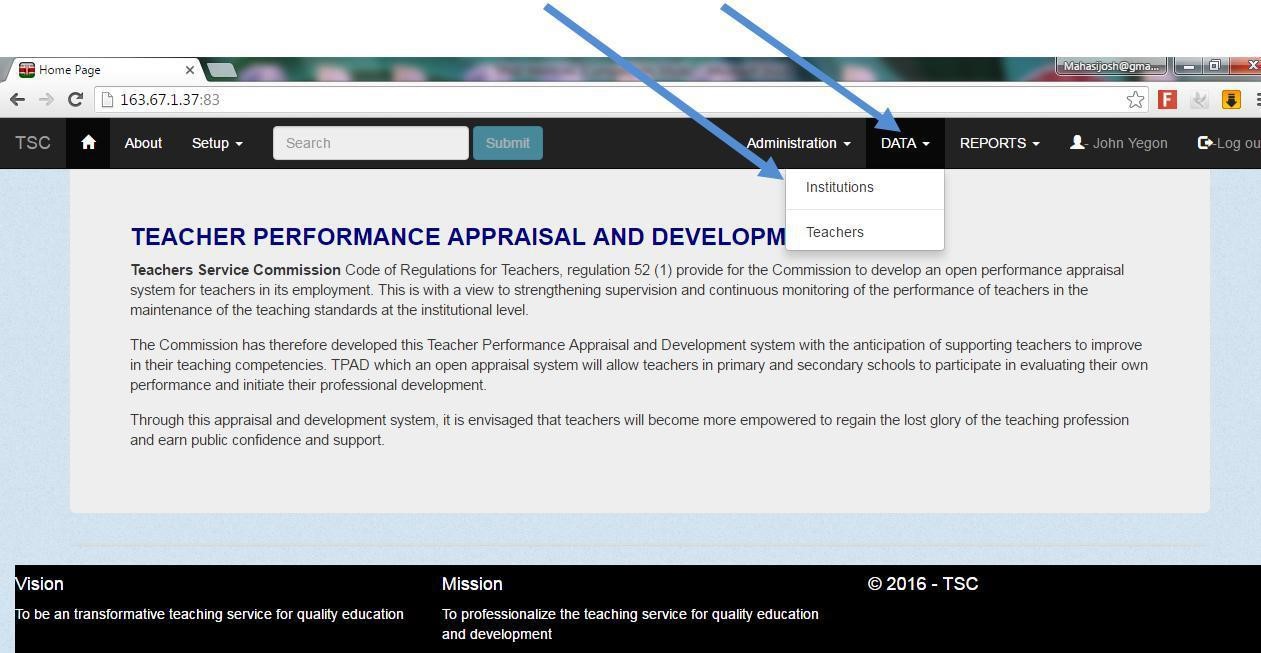
12. Click on the data tab and then click on institutions as shown


13. Click on my institution tab as shown
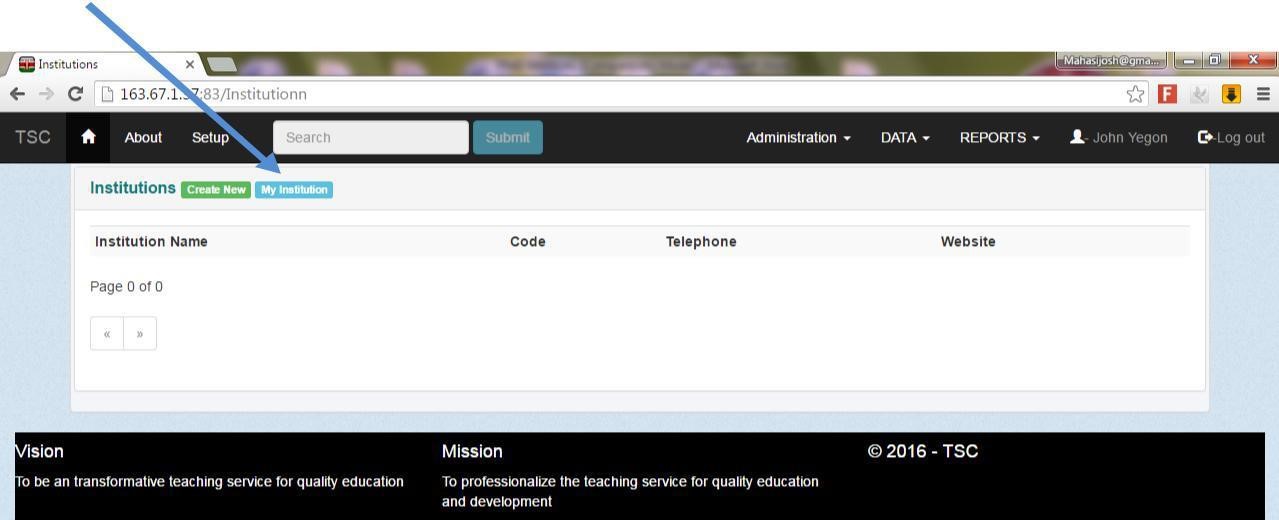
 

14. The list of the teachers in the institution will be displayed. Click appraisal button alongside your name.


15. If the appraisal form is not displayed, click on the create new button
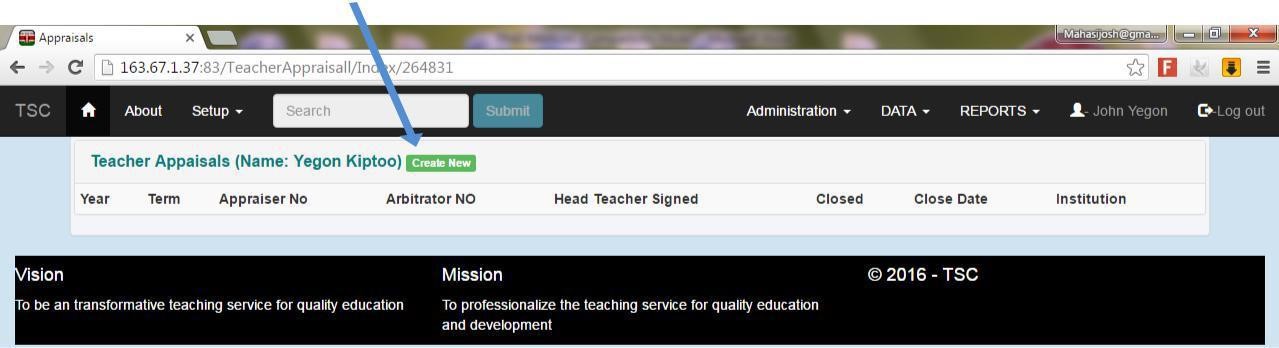
 

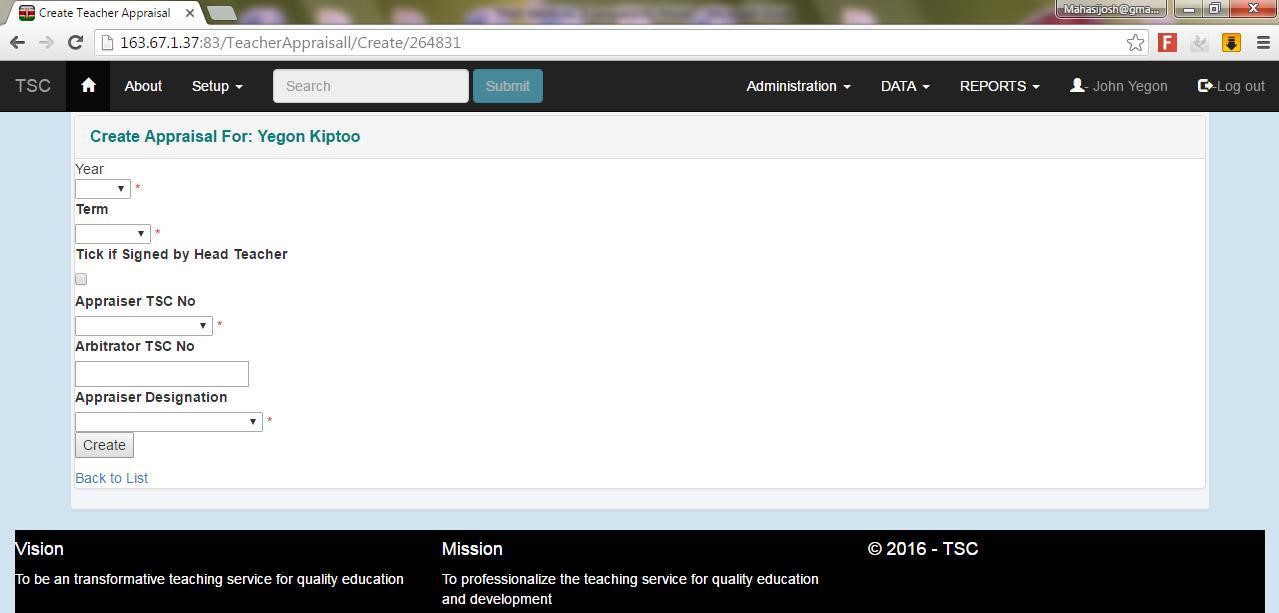
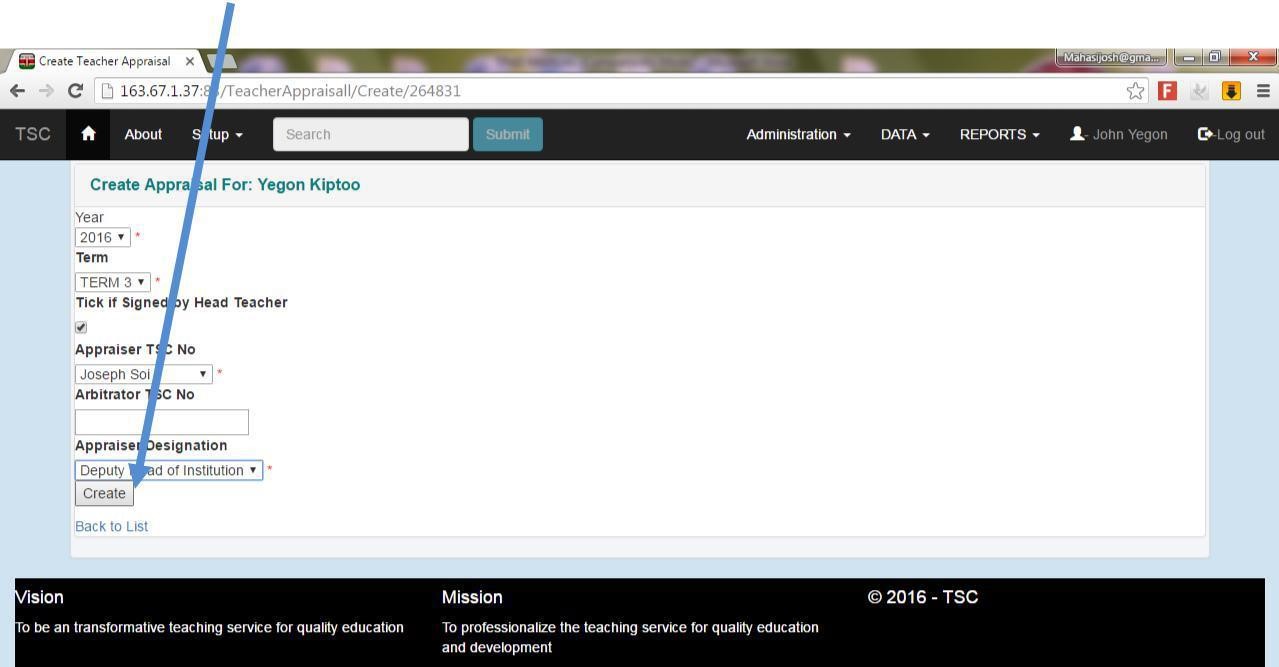
16. Fill in all the information in the spaces as shown below.


17. Click on the create button
18. Click on the action tab dropdown arrow and select the respective form for filling
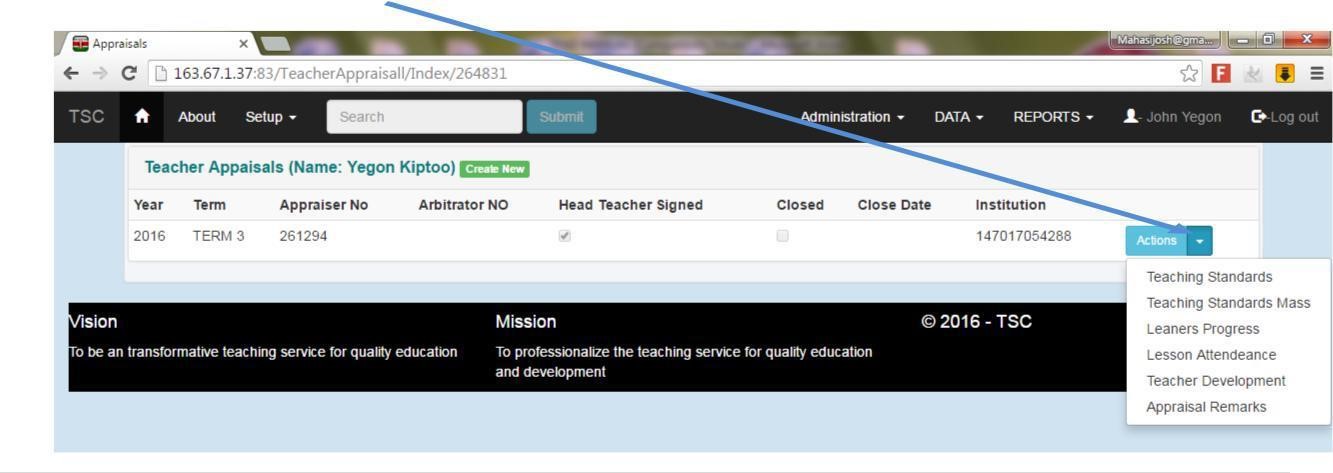


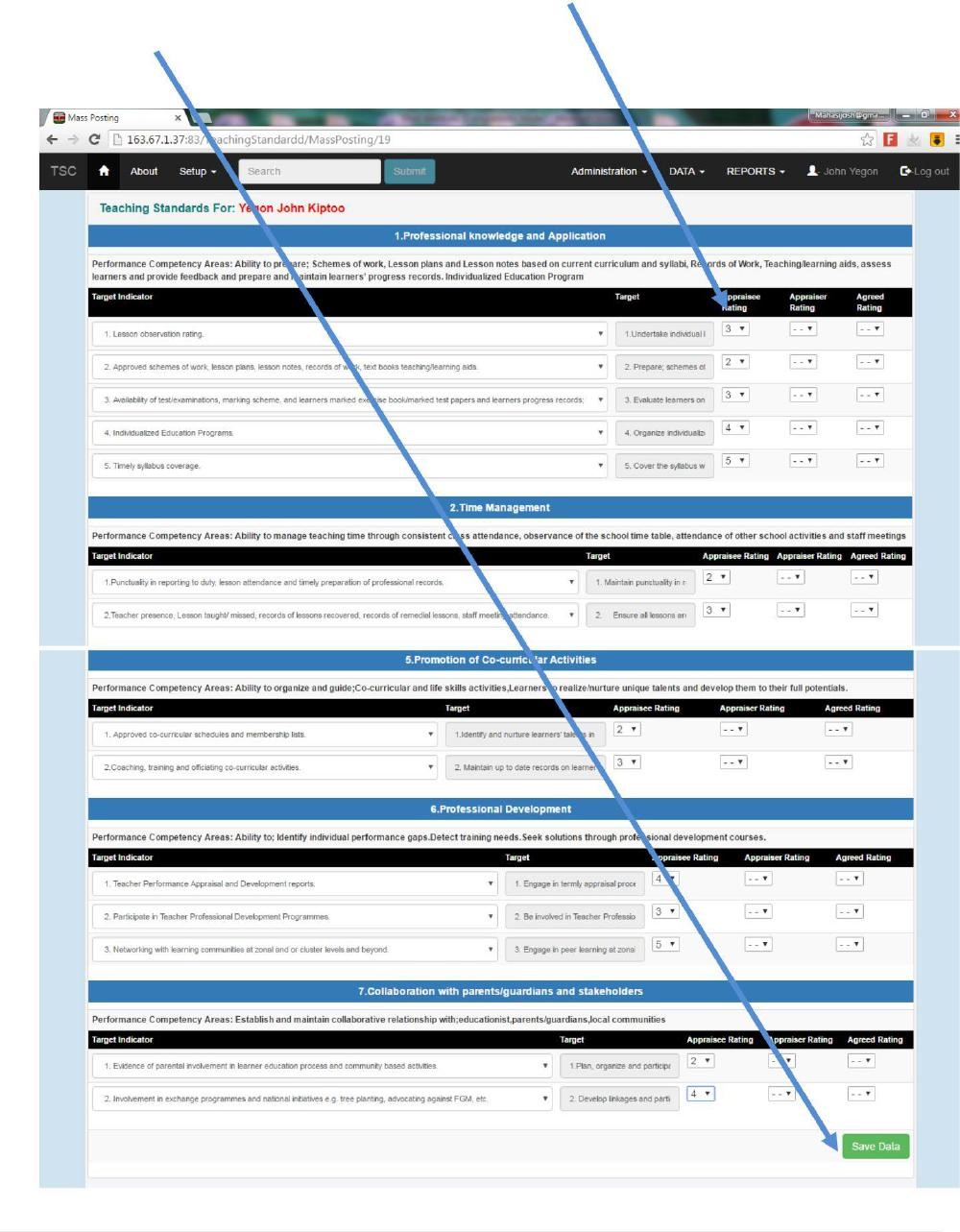
19. For example, click on the teaching standard mass to appraise/rate yourself accordingly then click the save data button
 

More Read

Teachers Urged to Start Side Hustles Instead of Taking Loans
TSC Posting Criteria for Recently Promoted Teachers
New Teachers’ Pay Agreement: Increment and Deductions Explained
List of Successful Teacher Administrators Promoted in July and August
TSC to Demote Non-Graduate Headteachers

You Might Also Like

How to Apply for a TSC Number Online: Step-by-Step Guide and Requirements

Reviewed House Allowance for Civil Servants

Debatable New TSC Teacher Recruitment Rules

The TSC will no longer hire teachers under contracts with fixed terms.

Teachers Promotion Interviews Enters The Second Week

Share This Article
Facebook Twitter Whatsapp Whatsapp Telegram Print
React to show how you feel about this article?
Love0
Joy0
Sad0
Happy1
Angry0
Wink0
Previous Article 2022 Schemes of work free download
Next Article KNEC Examiners training application
Leave a comment

Leave a Reply Cancel reply

Your email address will not be published. Required fields are marked *

TSC UPDATES

Teachers Urged to Start Side Hustles Instead of Taking Loans
Edu News TSC
TSC Posting Criteria for Recently Promoted Teachers
TSC
New Teachers' Pay Agreement
New Teachers’ Pay Agreement: Increment and Deductions Explained
TSC
TSC new jobs
List of Successful Teacher Administrators Promoted in July and August
TSC
TSC Initiates Measures to Demote Non-Graduate Headteachers
TSC to Demote Non-Graduate Headteachers
TSC
How to Apply for a TSC Number Online
How to Apply for a TSC Number Online: Step-by-Step Guide and Requirements
TSC

Trending News

TSC recruitment
TSC Begins Posting 2,014 Replacement Teachers to Bridge Staffing Shortage
Edu News
Teachers Urged to Start Side Hustles Instead of Taking Loans
Edu News TSC
TSC allocated Ksh 1 Billion for December 2025 Teacher Promotions
Edu News
EXAMPLEARTICLE
Uncategorized
EXAMPLEARTICLE
Uncategorized
Plot to Arrest Governor Simba Arati
Edu News
TSC Posting Criteria for Recently Promoted Teachers
TSC

Quick Link

  • SUBSCRIBE
  • Registration
  • My Bookmarks
  • Home
  • Mocks

Categories

  • Notes
  • Schemes
  • ExamsHOT
  • TSCnEW
  • Edu News
  • Jobs

Sign Up for Our Newsletter

Subscribe to our newsletter to get our newest articles instantly!

[mc4wp_form]

Mwalimu NewsMwalimu News
© 2022 Mwalimu News. Web design by 0700584958. All Rights Reserved.
  • Home
  • Blog
  • Advertise
  • Privacy Policy
  • Contact
Welcome Back!

Sign in to your account

Lost your password?